This article explains the main options for automating customer support, from chatbots and self-service portals to voicebots, emailbots and AI Copilots. It shows why the slow season is the best time to introduce these tools and how to decide where to begin. The article draws on data from Gartner, McKinsey and Daktela.
.png)
Every company experiences periods when the phones ring less often and the inbox fills up more slowly than usual. For one business, it may be summer; for another, the weeks after Christmas or a particular month outside the main season. Whenever your slow season occurs, that temporary lull is more valuable than it may seem at first. It is the ideal time to start automating customer support.
Implementing a chatbot or another automation tool is not simply a matter of switching it on and considering the job done. It is a testing cycle. The software may be up and running within a few days, but the knowledge base, escalation rules and tone of voice need to be refined over several weeks using real customer conversations. Those weeks have to come from somewhere, and the most cost-effective time is during a quieter period, when any mistakes affect fewer customers and the team has time to adapt before peak demand puts the new setup under real pressure.
Not every company has a quiet summer. Travel agencies, seasonal e-shops and service providers may experience their busiest period at this time of year. However, the same principle applies regardless of when your quieter season occurs: it is the safest time to introduce new automation. If a new tool encounters problems during a slower period, the impact is limited and easier to fix. If it fails during the busiest month of the year, every mistake affects the operations that matter most to the business.
Customers are also unforgiving when it comes to mistakes. According to a Daktela survey of 1,000 customers, 8 out of 10 people will leave after just one or two poor experiences (80.8% in the Czech Republic and 82.6% in Slovakia). That is why it pays to fine-tune new automation during a quieter period rather than under the pressure of peak demand.
Companies that wait and introduce automation in the middle of the busiest season miss out on the crucial fine-tuning phase. And it is this phase that determines whether the solution can handle the pressure or whether the team switches it off when demand surges. The slow season is therefore not a pause, but a head start.
Customer support automation is not a single tool, but a combination of several complementary layers. In practice, these mainly include:
Each layer addresses a different part of the customer journey. There is no need to implement everything at once. It makes more sense to start with the solution that can handle the largest volume of your enquiries. Let’s take a closer look at each option.
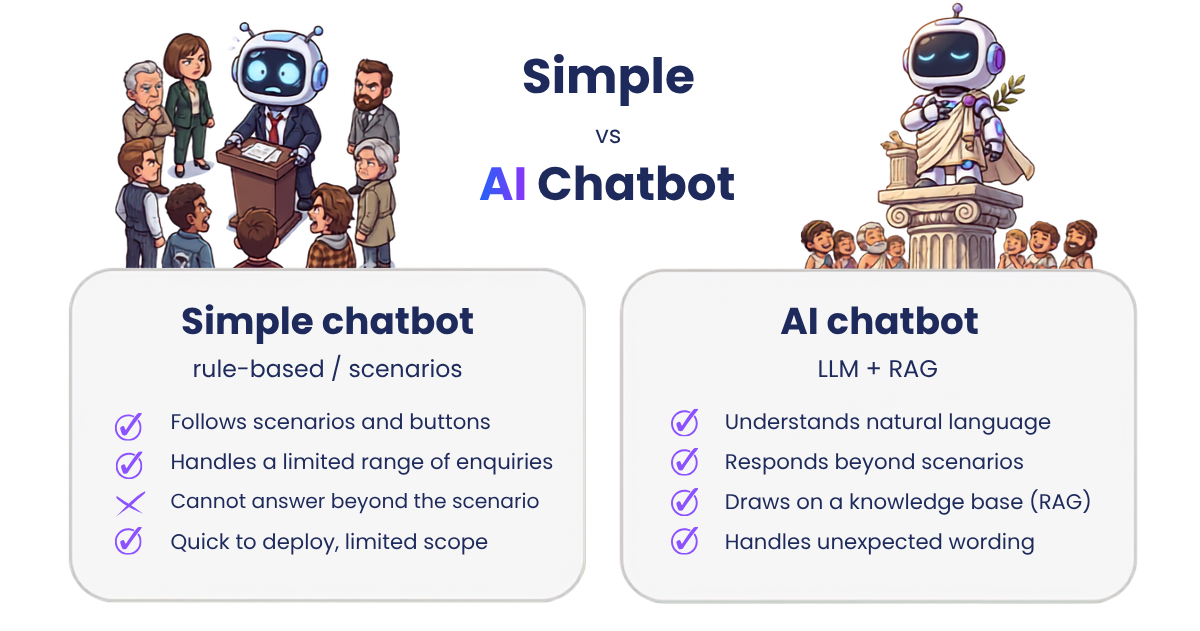
A chatbot is a program that responds to customers in real time through a chat window on a website, in an app or on social media. The difference between the various types is crucial when it comes to what you can expect from them.
A simple rule-based chatbot follows predefined scenarios and button-based options. It can reliably handle a limited range of enquiries, such as checking an order status, providing a complaints form or sharing opening hours, but it cannot respond outside the prepared flow. An AI chatbot for customer support uses a large language model (LLM), understands enquiries even when they fall outside a predefined decision tree, retrieves answers from a knowledge base using RAG technology and responds to unexpected wording.
What is RAG (retrieval-augmented generation)? It is a technique in which an AI model first searches a company’s knowledge base for relevant information before generating a response based on those sources. This means the AI chatbot does not answer “off the top of its head” but uses the company’s current information, reducing the risk of fabricated responses.
According to a McKinsey case study, one bank’s deployment of a chatbot in its contact centre eliminated waiting times for approximately 20% of customer interactions within the first seven weeks of operation. The implementation of Daktela’s AI chatbot at Seznam.cz shows that the same approach also works in the local market. Its chatbot resolves up to 75% of B2C enquiries without agent involvement and automatically handles 85% of enquiries outside business hours.
A self-service portal gives customers access to answers without needing to contact support. FAQs, guides, order statuses and invoices are all available in one place. However, it is only as effective as the knowledge base it draws from.
Only 14% of enquiries are fully resolved through self-service. According to a Gartner survey of 5,728 customers, 73% use self-service at least occasionally, but only 14% of enquiries are fully resolved. Even among cases that customers themselves describe as very simple, the figure reaches just 36%. The most common reason is content that does not match what the customer is looking for.
The conclusion is simple: a self-service portal is not a “set it and forget it” solution. Without regular content maintenance, its potential remains underused. That is also why the knowledge base forms the foundation for both an AI chatbot and an AI Copilot.
An AI voicebot is the voice-based equivalent of a chatbot. It automatically handles phone calls and performs tasks that previously required a human agent. It can verify the caller’s identity, check the status of an order or request, answer frequently asked questions, or route the call to the correct department or a live agent.
Unlike traditional touch-tone menus, also known as IVR systems, where callers hear instructions such as “press two for complaints”, a modern voicebot powered by AI and a language model understands natural speech. Callers can explain what they need in their own words, and the voicebot can ask follow-up questions to collect any missing information instead of forcing them through a fixed button-based menu.
By combining smart dialling, a voicebot and automation, Fincollect doubled its contact rate, improved response times by 40% and reduced costs by 30%.
The phone is also the most immediate communication channel. The response is delivered instantly and cannot be edited before it is sent, as an email can. This makes a well-maintained knowledge base and a clearly defined handover to a live agent especially important whenever the voicebot is unable to resolve an enquiry.
Email and ticket support typically involves three layers: automatically categorising and prioritising tickets based on their content, suggesting responses for agents, and fully automating recurring requests. AI Emailbot covers all three. Using natural language processing (NLP), it identifies the intent of an incoming email, categorises and prioritises it, and responds directly to common enquiries based on the scenarios you configure. At Seznam.cz, the emailbot resolves 60% of requests without agent involvement, saving the capacity of one full-time agent.
Emailbot does more than simply generate replies. It can also update ticket properties, such as categories, statuses and deadlines, thereby automating the entire workflow around email communication. More complex cases that fall outside the configured scenarios are handed over to a live agent together with the full context, so the customer does not have to repeat anything. Response accuracy can also be improved over time by training the system on real customer interactions.
A key advantage of email automation is that, unlike a chatbot, it does not necessarily have to operate in real time. The company can let the system work in the background and involve a human only where needed.
Not every form of automation means that a robot communicates directly with the customer. AI Copilot works in the background of a human conversation, assisting the agent rather than replacing them. Depending on the specific tool, it can suggest a response, retrieve information from the knowledge base or summarise the conversation so far. However, the final response is always reviewed and sent by a person, following a human-in-the-loop model.
What is human-in-the-loop (HITL)? It is an approach to AI automation in which the final decision or response is always made or sent by a person. AI prepares the supporting information or a suggested reply, but does not send anything independently. This reduces the risk of errors in sensitive enquiries and is typically the first step before deploying a fully autonomous chatbot.
The main benefit of such an assistant is speed. According to a McKinsey analysis, the introduction of an AI assistant for agents at a European telecommunications and media company reduced the time agents spent searching for information during calls by 65%. And we do not have to look far for another strong result. At Gafa Auto, AI Copilot features such as ticket summaries and suggested responses helped reduce call times from 8–9 minutes to approximately 6 minutes.
Progress from phase 1 to phase 3, moving from the lowest to the highest level of AI autonomy. Phases 1 and 2 can be safely fine-tuned during the slow season, while phase 3 should only be introduced once the data and processes have been thoroughly tested.
Customer support automation cannot be switched on overnight. It takes time to implement, fine-tune the knowledge base and test the solution in real-world operations. That time is most cost-effective when business is quieter. The slow season is therefore not simply a period to get through, but the best window of the year to start implementing automation without unnecessary pressure.
Whether your first step is an emailbot, an AI Copilot for agents or a chatbot, the same principle applies: companies that implement and fine-tune the solution now will enter the next peak season with a head start. Those that wait will be launching a new tool in the middle of the busiest period, which is the worst possible time.